Jetpack CRM is designed for small businesses to effectively manage their customer relationships. This plugin allows users to handle leads, invoicing, billing, and email marketing all in one place.
With its user-friendly interface, Jetpack CRM simplifies the process of managing client interactions and transactions. It is particularly beneficial for eCommerce sites, agencies, and freelancers looking to streamline their operations.
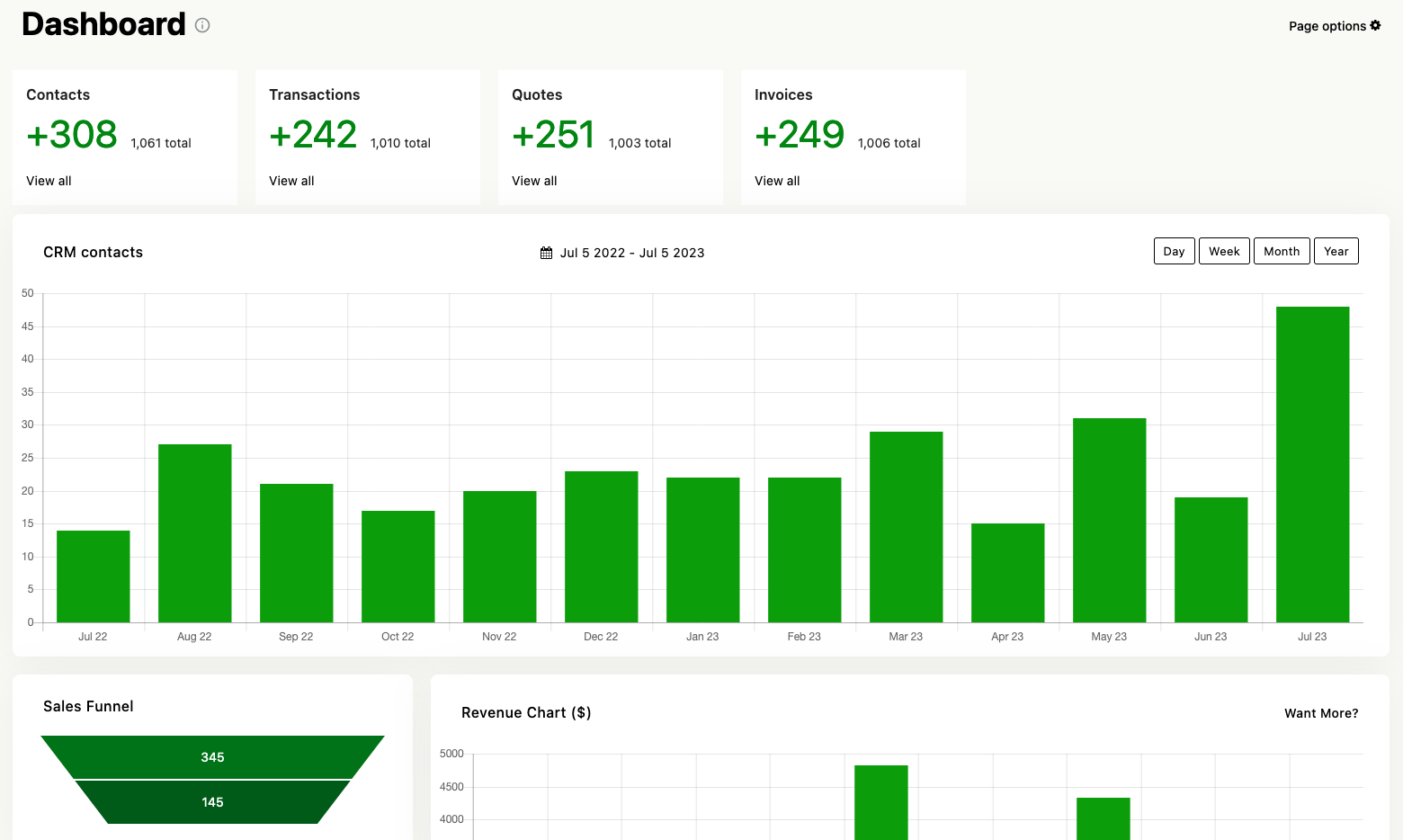
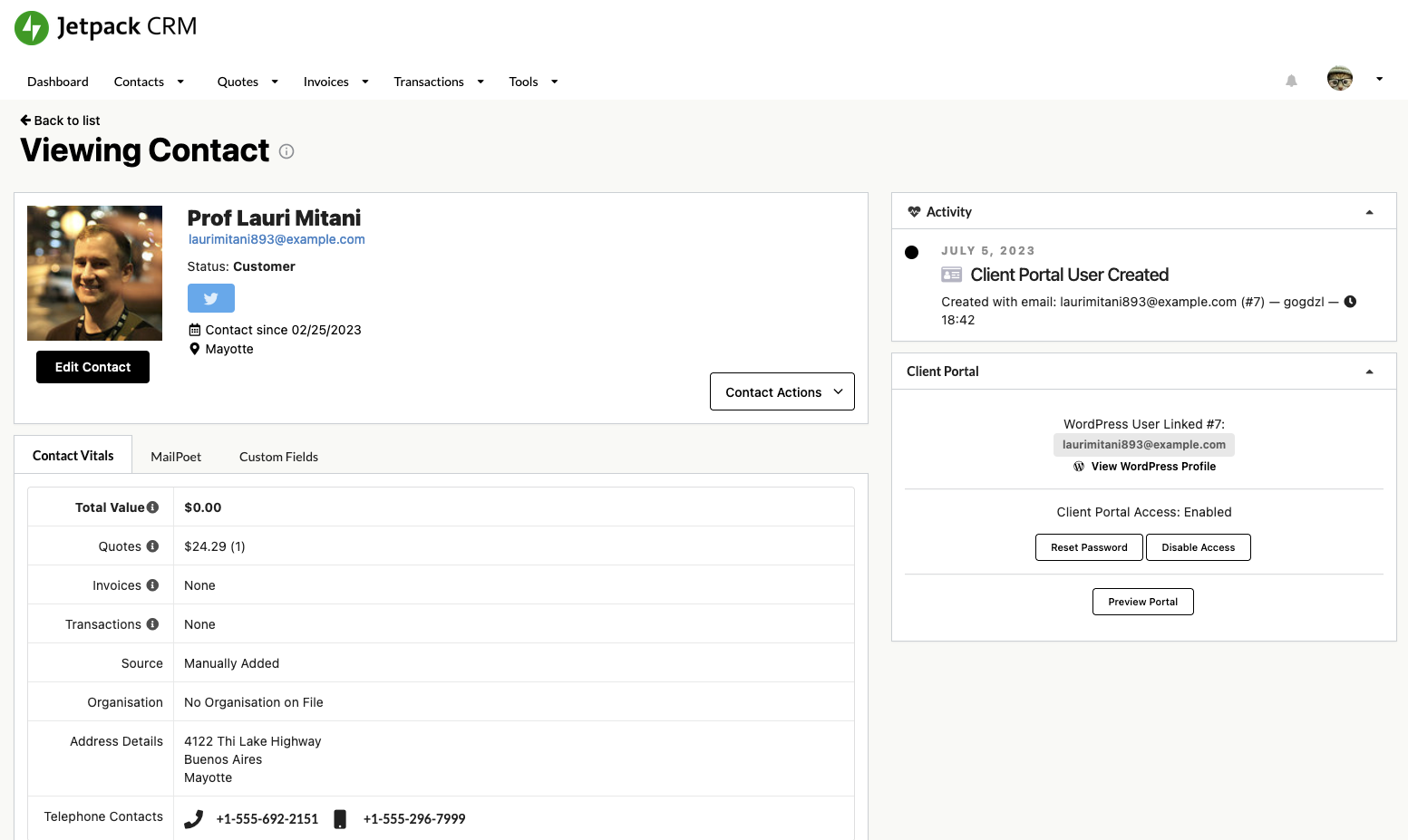
Features include a client portal for easy access to quotes and invoices, lead generation tools, and integration with payment gateways like Stripe and PayPal. The plugin is also compatible with WooCommerce, allowing for seamless synchronization of customer data and transactions.
Other Notable Features
Here are a few other notable features of this free
Jetpack CRM – Clients, Leads, Invoices, Billing, Email Marketing, & Automation plugin.
Client Portal
CRM
Lead Generation
Marketing Automation
WooCommerce CRM
Screenshots
FAQ
There are absolutely no limits in Jetpack CRM, apart from the usual ones applied by your host (database size etc.), you can create as many clients or invoices as you’d like!
Totally. The core is a solid, useful, Customer Relationship Manager right out of the box. You don’t need anything else to get started managing your leads, and customers. We do build extensions, (because we need them), but they’re not at all essential. Further, they’re cheap in comparison to the pay-per-month CRM options.
Of course. Please reach out to us via the in-plugin feedback page if you want to, we’ll help you get started, or check out our Developer resources.
We haven’t published our roadmap since v3, but we may do in the future. You can vote on future extensions on our Coming Soon page.
You can see all the CRM power-ups here: https://jetpackcrm.com/extensions/
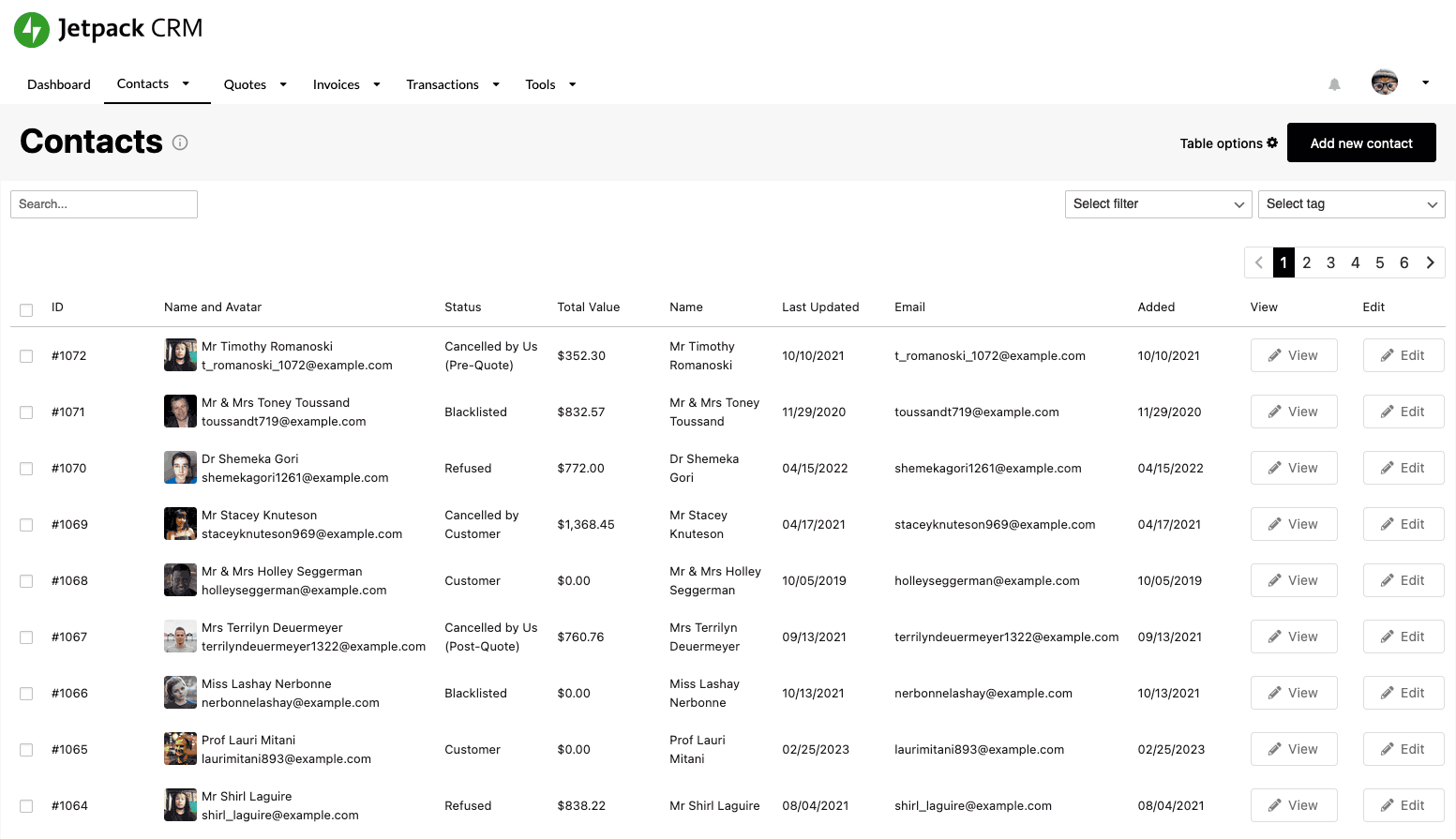
Yes, Jetpack CRM comes with a search feature that allows you to run a customer search, contact search, and then act on it, letting you easily manage contacts. There’s also search for transactions, quotes, invoices, companys, lead forms, and tasks.
Data privacy, control, extensibility. GDPR compliance. You’re probably already paying for hosting too, so you’ll save there. SaaS has its place, but there’s so much value in hosting your own (e.g. for GDPR rules you need to know where your contacts data is kept)!
The free core is fully integrated with WooCommerce using the built-in WooSync module. It also has a basic CSV Importer which works well and allows you to import contacts and import customer data. You can also use our paid extensions for additional features: CSV Importer Pro, PayPal Sync, or Stripe Sync – these automatically pull up all your contact data (including transactions) and then keep it up to date for you!
Most CRM providers allow you to export your contact data in CSV format, which can then be used to upload into Jetpack CRM. The CSV Importer Pro extension can then be used to import contacts and customer data. CRM is a very broad landscape, so each CRM may have different ways of storing data. See our CRM Knowledgebase for more information, or ask in the forums!
Yes, Jetpack CRM has a Business to Business mode. Enabling the B2B CRM Extension adds a “Companies” layer, which lets you have contacts under a company.
Jetpack CRM allows you to manage contacts at companies from within the CRM. This adds a hierarchy to your CRM, letting you add a contact to a company using our contact manager. Currently you can bill (invoice) companies or contacts respectively, but in the future we want to make this much more integrated.
For now, this works as follows:
Make a company (e.g. “Davidsons Ltd.”)
Make a contact, e.g. “Dave Davidson”.
As part of making or editing this new contact you will be able to assign them to the company made in step 1.
Invoices and transactions can then be assigned to either “Davidsons Ltd.” or “Dave Davidson” directly.
Jetpack CRM allows you to create and manage quotes, invoices, and transactions against contacts. While this setup may be used in some senses like an ecommerce platform, really the aim with Jetpack CRM is to effectively manage a contact list, including manually billing them (e.g. getting invoices paid online). This works well, via our client portal, but if you want a fuller ecommerce setup, we recommend using it alongside WooCommerce, which we tightly integrate with.
Bookings: While Jetpack CRM has a useful Task Scheduler, which can help manage tasks against contacts, we do not have a pure booking layer. For this we recommend using WooCommerce and a WooCommerce bookings plugin, integrated into Jetpack CRM via WooSync. Recurring subscriptions: Much as above, you could create an invoice via Jetpack CRM, then make it recur via Stripe and have that synced into Jetpack CRM via Stripe Sync, but in this instance we’d recommend using WooCommerce subscriptions.
Yes, Jetpack CRM allows you to easily capture leads using our lead capture forms. These could be added into posts, pages or widgets – when leads fill them out their information goes straight into the CRM.
Jetpack CRM ships with its own form builder, which lets you insert forms into your posts and pages via shortcode forms or iframe forms. For users that need more advanced form features, we offer support for Jetpack Forms out of the box, and have integrations with Contact Form 7 and Gravity Forms via paid CRM extensions.
We occasionally get asked if Jetpack CRM can help calculate and pay sales commissions. We do have some users who are using the CRM for this, but there are no direct features out of the box which will provide this functionality, these users are simply totting up the transactions assigned to contacts based on their ‘owners’ in Jetpack CRM, then paying these commissions manually. We may in future expand our reporting to offer something along the lines of a sales summary per agent.
To send out email broadcasts such as newsletters or other email marketing you will need to purchase Jetpack Mail Campaigns, or a bundle which includes it. In short, it’s worth paying for a quality mail sending plugin because it can make the difference between your newsletters being well received, or ending up in the spam box.
Jetpack CRM has its own Automations extension which uses Triggers, Conditions, and Actions to automate workflows based on CRM events. This can be used in lead generation, email marketing, or internal business admin. If you have an idea for a workflow or automation you’d like to see, please do submit it as a feature request.
We have over 30 premium extensions available in our CRM extension store. These are totally optional, but supercharge some aspects of the CRM, (e.g. StripeSync automatically pulls in your customer and transaction data from Stripe).
Most users tend to purchase bundles of extensions, which allows them to ‘make their perfect CRM’:
You can now add your license key into your Jetpack CRM settings page (under ‘CRM License’). This is only required if you wish to use paid extensions. To get started with premium CRM extensions, please visit our extension store.
After you’ve purchased you’ll be guided to your new license key and extension plugin download.
We have many agencies using Jetpack CRM, so this is a common question.
To get stared please see our bundles page – if you’re likely to need 10~ licenses, the best bet is to get started with the Reseller package. If you want to build up more slowly, please purchase the Entrepreneur bundle and let us know via a support ticket if you would like to add additional licenses to your account.
We offer a full, no-hassle refund within 14 days. You can read more about that, and how to request a refund, on this page.
Contributors and developers
“Jetpack CRM – Clients, Leads, Invoices, Billing, Email Marketing, & Automation”
is open source software. The following people have
contributed to this plugin.
I was actually very excited when I first installed it, it seemed very user-friendly and feature-rich. But I deleted the plugin when I saw that a very basic feature was missing. There is no feature to add products to invoices and quotes. You cannot create invoices or quotes by selecting Woocommerce products. It is useless without this.
Emre O.
July 5, 2025
|
1 reply
Very professional
I’m not an expert and I’m just starting to use it: my impression is very favorable, it seems like an excellent CRM. The support is very professional. Just like their products.
brnwp
December 13, 2025
|
1 reply
Nice visual CRM to start business activities
For now, i only tried the free version and i get green lights to take it in PRO version.Jetpack CRM seems fine to me even if i don’t deploy it live on my WooCommerce installation.Globally the interface is ok… but seems little old-fashioned-style and need obviously several modern UX Improvements.Same for the UX wording used on the UI… its adding sometimes cognitive charge to understand some simply effect or rules throughout the tool.About the features, il love the way we can manage contacts and sort them as “type” during the marketing cycle journey.Same for the ease to manage Quotes, Bills, and transactions and the agility to adapt if needed.what is missing for me : Better integrations of thirds Woo extensions (when its automatic) WooCommerce Tax for instance, but i think its probablement the same with other automatic Woo extensions.what i need to test : The portal what is a very nice feature, i need to see if it integrates seamlessly with my builder (Cornerstone).
Rock-solid, extensible CRM for WordPress (5+ years of use)
I’ve been using Jetpack CRM for over 5 years across my own and real client projects, and it has proven to be a solid, flexible CRM for WordPress-based businesses. One of its biggest strengths is how extensible it is, the data structure, hooks, and overall architecture make it possible to adapt the CRM to very specific business workflows. I’ve successfully implemented deep customizations that go well beyond the default feature set by integrating other plugins, this is key. That said, this is not a “no-code” CRM if your needs are complex. For advanced customizations, integrations, or workflow changes, you’ll need a developer who understands WordPress and the plugin’s internals. The support team is clear about this, which I appreciate. If you’re looking for a CRM that grows with your business and doesn’t lock you into a rigid system, Jetpack CRM is a strong choice (I can also help if you have any specific needs). The original “NO BS CRM” still stands true, but customizations can make this the ultimate tool for business success and automations.
mdedsm
January 31, 2026
|
1 reply
Very professional
I’m not an expert and I’m just starting to use it: my impression is very favorable, it seems like an excellent CRM. The support is very professional. Just like their products.
brnwp
December 13, 2025
|
1 reply
Form didn’t work
Welp! It installs great and looks fantastic, however when I tried to create a form several times, the only field that showed up was email. I kept looking for ways to overcome this with no luck. I then installed another form to use with it but saw no way to put the two together. If you’re better at WP maybe you’ll have better luck.
Rock-solid, extensible CRM for WordPress (5+ years of use)
I’ve been using Jetpack CRM for over 5 years across my own and real client projects, and it has proven to be a solid, flexible CRM for WordPress-based businesses. One of its biggest strengths is how extensible it is, the data structure, hooks, and overall architecture make it possible to adapt the CRM to very specific business workflows. I’ve successfully implemented deep customizations that go well beyond the default feature set by integrating other plugins, this is key. That said, this is not a “no-code” CRM if your needs are complex. For advanced customizations, integrations, or workflow changes, you’ll need a developer who understands WordPress and the plugin’s internals. The support team is clear about this, which I appreciate. If you’re looking for a CRM that grows with your business and doesn’t lock you into a rigid system, Jetpack CRM is a strong choice (I can also help if you have any specific needs). The original “NO BS CRM” still stands true, but customizations can make this the ultimate tool for business success and automations.
mdedsm
January 31, 2026
|
1 reply
Very professional
I’m not an expert and I’m just starting to use it: my impression is very favorable, it seems like an excellent CRM. The support is very professional. Just like their products.
brnwp
December 13, 2025
|
1 reply
Form didn’t work
Welp! It installs great and looks fantastic, however when I tried to create a form several times, the only field that showed up was email. I kept looking for ways to overcome this with no luck. I then installed another form to use with it but saw no way to put the two together. If you’re better at WP maybe you’ll have better luck.
I was actually very excited when I first installed it, it seemed very user-friendly and feature-rich. But I deleted the plugin when I saw that a very basic feature was missing. There is no feature to add products to invoices and quotes. You cannot create invoices or quotes by selecting Woocommerce products. It is useless without this.
Emre O.
July 5, 2025
|
1 reply
Nice visual CRM to start business activities
For now, i only tried the free version and i get green lights to take it in PRO version.Jetpack CRM seems fine to me even if i don’t deploy it live on my WooCommerce installation.Globally the interface is ok… but seems little old-fashioned-style and need obviously several modern UX Improvements.Same for the UX wording used on the UI… its adding sometimes cognitive charge to understand some simply effect or rules throughout the tool.About the features, il love the way we can manage contacts and sort them as “type” during the marketing cycle journey.Same for the ease to manage Quotes, Bills, and transactions and the agility to adapt if needed.what is missing for me : Better integrations of thirds Woo extensions (when its automatic) WooCommerce Tax for instance, but i think its probablement the same with other automatic Woo extensions.what i need to test : The portal what is a very nice feature, i need to see if it integrates seamlessly with my builder (Cornerstone).
florian94
August 6, 2025
|
Support Issue
I paid for the Enterprise license through April 2026. Currently, this license is on my development site, I want to transfer it to my production site. I have been trying to get this resolved for over a month, but little to no response from support. If the policy is to fill out the form for support, then support should respond. in a timely manner This has be going on for over a month. At least they could let me know the status. Support apologized for the communication issue. They were very friendly and helpful. The good news is that the issue is now resolved. Now, I am happy and back in business. Thanks again Stef for looking into this.
“Jetpack CRM – Clients, Leads, Invoices, Billing, Email Marketing, & Automation” has been translated into 14 locales. Thank you to the translators for their contributions.








 Security –