Very good
Very good plugin. The dashboard is a little confusing at first, but works well!
Works Invisible For enlargement of images
Reduction of image size is easier done than enlargement. But Perfect images does a very good job of enlarging small images to fit the feature image size set by my theme. The enlarged image could use some shapening though. 5 to 10% at most. It’s a little fuzzy now. An option to automatically remove Exim data for GDPR would be a welcome additional feature. All in all, a great plugin. I have the Pro version. Worth every penny. highly recommended.
Super Convenient
It’s easy to use and does a great job
Professional plugin!
When it comes to obtaining lightweight, professional-quality images, this plugin is the perfect choice. Fidelity boils down to delivering the real image in Webp and Avif format without introducing elements that show a modified image to make it look good. In this plugin, quality is taken seriously and without complications. You don’t need to waste time checking if this plugin is doing what it should do, because it simply does it, and does it magnificently. If you have a lot of images, this is the right plugin. If you have thousands of images, this is the magnificent plugin! The full version is worth every penny!
A solid, lightweight and deeply useful image-management plugin
I can confidently recommend Perfect Images — it’s the kind of plugin that should really be part of WordPress core: lightweight, sensible, and gives developers and site-owners real control over their media library. Whether you manage a small blog, a complex site with galleries, or a large portfolio of images, this plugin is a great foundation for clean, efficient image handling. Thanks to Jordy Meow for building such a thoughtful, reliable tool — it definitely deserves a spot in every WordPress installation.
Very useful, although some improvements required
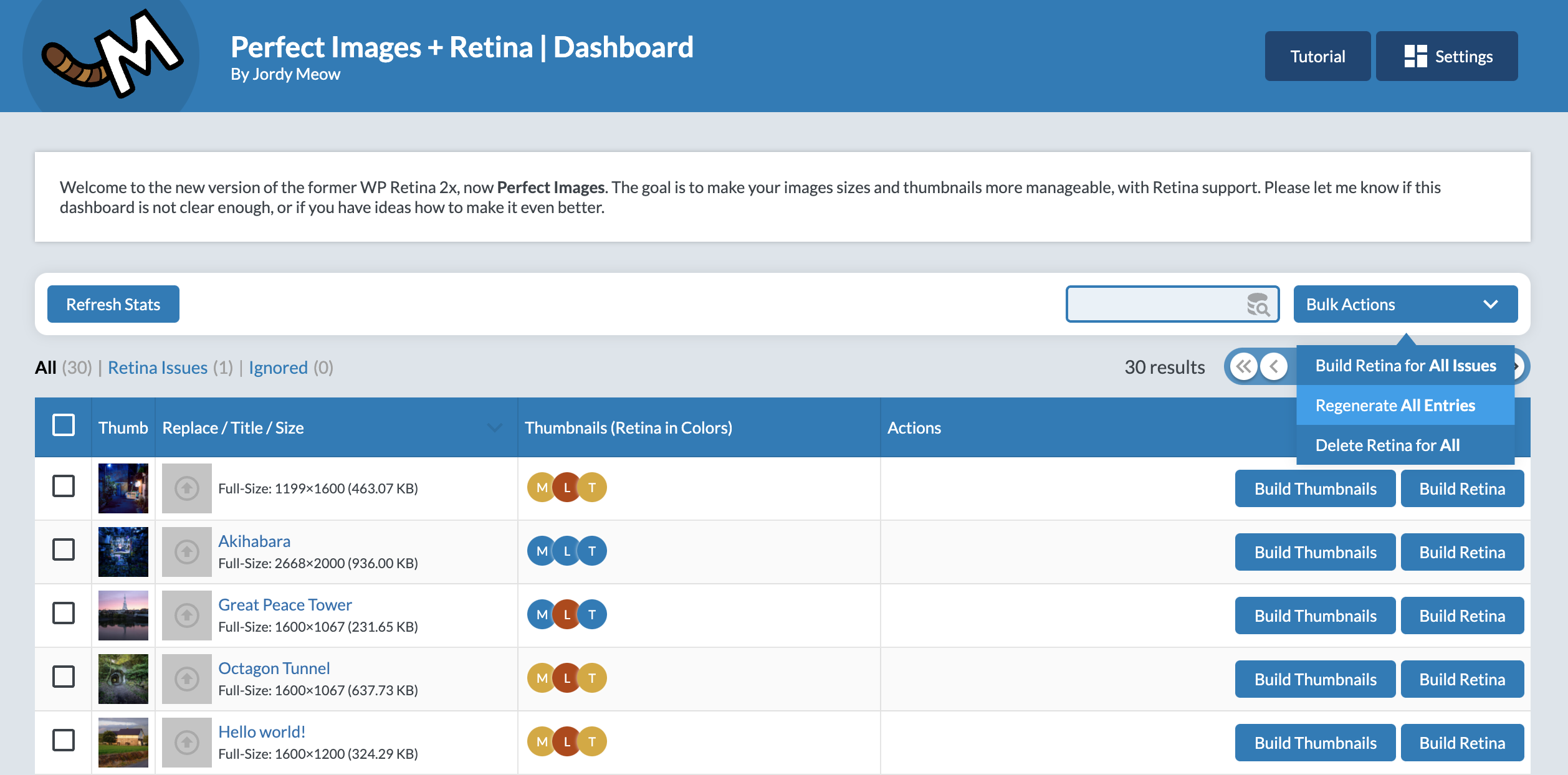
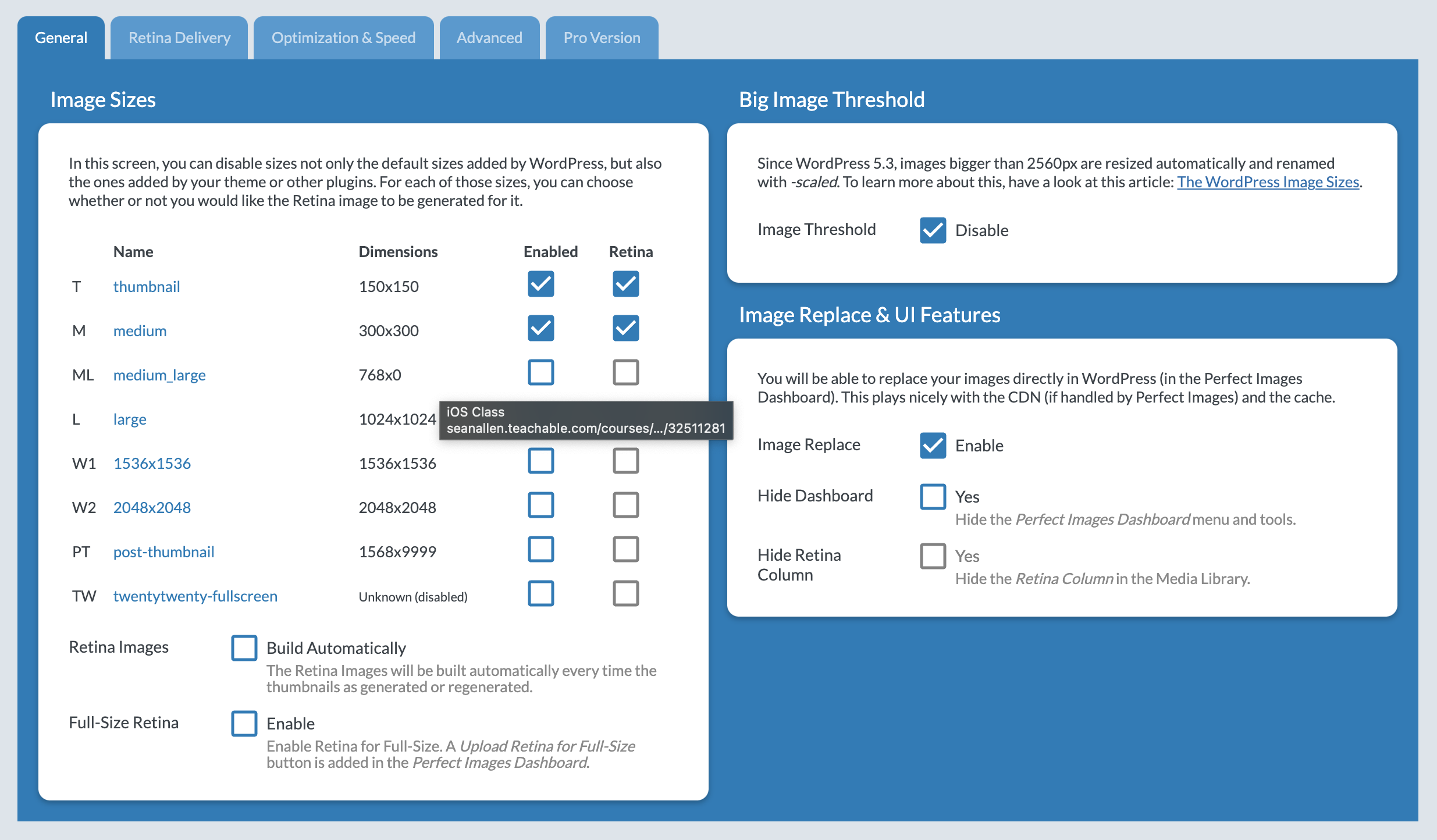
I evaluated Perfect Images (free version) as a replacement for plugin Regenerate Thumbnails (whose author sadly passed away and thus the plugin is not maintained any longer, although it still works). I found Perfect Images very useful, especially regarding the following features: permanently disable unused WP thumbnail sizes (this is not possible in Regenerate Thumbnails, so I previously disabled the standard WP 1536px image size in the media.php, but this is overwritten from time to time, and I never found where the 736px image size is declared, so I could not disable this one) The dashboard shows images with old unused thumnail sizes and you can regenerate thumbnails (including deleting old unused sizes after disabling them) from the dashboard like with all of Jeordy’s plugins, I appreciate the focus on lean development, speed, and performance I did not (yet) use the retina or AI features, so no opinion on those. This plugin really has the potential for a five star rating, but it is not quite there. I’m really missing some features: it’s almost impossible to find a specific image in the dashboard, except for the most recent uploads, because it lacks search capabilities. Nobody wants to page through an endless number of pages in order to find an image. There should be at least the standard search capabilities of WP media library in the dashboard: by date, by category (I don’t use tags a lot, but many people might appreciate a tag search as well), and ideally also a free text search by title/caption/alt text etc. Instead of re-implementing the standard WP media search capabilities in the dashboard, you could integrate Perfect Images into the WP media library via the bulk action tool (just like Regenerate Thumbnails does, i.e. the search and selection of images is done in the WP media library, and then under bulk actions there is a possibility to switch to the Perfect Images dashboard with the selected images being handed over). you can set the number of items per page in the dashboard drop down list, but this is not stored anywhere. Why doesn’t it remember the last selection I made? Or have the possibility to set a default value in the settings? And why is 250 the maximum value, why not include 500 or even 1000? In the end, it should be my decision to wait a little longer for a longer list but then scroll faster, or to have little wait lime for a shorter list, but then need to page through endless pages… when you regenerate the Thumbnails via the Build Thumbnails button, it would be great to have an option if you want to delete the old unused sizes or not. I appreciate it currently deletes them (although the documentation and tooltips do not reflect this), but the decision should made by the user I would like to see the thumbnails in the dashoard in their original aspect ratio instead of being all squares In short: a great tool (and I really appreciate it being free!) with some room for improvements Thank you!

Professional plugin!
When it comes to obtaining lightweight, professional-quality images, this plugin is the perfect choice. Fidelity boils down to delivering the real image in Webp and Avif format without introducing elements that show a modified image to make it look good. In this plugin, quality is taken seriously and without complications. You don’t need to waste time checking if this plugin is doing what it should do, because it simply does it, and does it magnificently. If you have a lot of images, this is the right plugin. If you have thousands of images, this is the magnificent plugin! The full version is worth every penny!
A solid, lightweight and deeply useful image-management plugin
I can confidently recommend Perfect Images — it’s the kind of plugin that should really be part of WordPress core: lightweight, sensible, and gives developers and site-owners real control over their media library. Whether you manage a small blog, a complex site with galleries, or a large portfolio of images, this plugin is a great foundation for clean, efficient image handling. Thanks to Jordy Meow for building such a thoughtful, reliable tool — it definitely deserves a spot in every WordPress installation.
Works Invisible For enlargement of images
Reduction of image size is easier done than enlargement. But Perfect images does a very good job of enlarging small images to fit the feature image size set by my theme. The enlarged image could use some shapening though. 5 to 10% at most. It’s a little fuzzy now. An option to automatically remove Exim data for GDPR would be a welcome additional feature. All in all, a great plugin. I have the Pro version. Worth every penny. highly recommended.
Very useful, although some improvements required
I evaluated Perfect Images (free version) as a replacement for plugin Regenerate Thumbnails (whose author sadly passed away and thus the plugin is not maintained any longer, although it still works). I found Perfect Images very useful, especially regarding the following features: permanently disable unused WP thumbnail sizes (this is not possible in Regenerate Thumbnails, so I previously disabled the standard WP 1536px image size in the media.php, but this is overwritten from time to time, and I never found where the 736px image size is declared, so I could not disable this one) The dashboard shows images with old unused thumnail sizes and you can regenerate thumbnails (including deleting old unused sizes after disabling them) from the dashboard like with all of Jeordy’s plugins, I appreciate the focus on lean development, speed, and performance I did not (yet) use the retina or AI features, so no opinion on those. This plugin really has the potential for a five star rating, but it is not quite there. I’m really missing some features: it’s almost impossible to find a specific image in the dashboard, except for the most recent uploads, because it lacks search capabilities. Nobody wants to page through an endless number of pages in order to find an image. There should be at least the standard search capabilities of WP media library in the dashboard: by date, by category (I don’t use tags a lot, but many people might appreciate a tag search as well), and ideally also a free text search by title/caption/alt text etc. Instead of re-implementing the standard WP media search capabilities in the dashboard, you could integrate Perfect Images into the WP media library via the bulk action tool (just like Regenerate Thumbnails does, i.e. the search and selection of images is done in the WP media library, and then under bulk actions there is a possibility to switch to the Perfect Images dashboard with the selected images being handed over). you can set the number of items per page in the dashboard drop down list, but this is not stored anywhere. Why doesn’t it remember the last selection I made? Or have the possibility to set a default value in the settings? And why is 250 the maximum value, why not include 500 or even 1000? In the end, it should be my decision to wait a little longer for a longer list but then scroll faster, or to have little wait lime for a shorter list, but then need to page through endless pages… when you regenerate the Thumbnails via the Build Thumbnails button, it would be great to have an option if you want to delete the old unused sizes or not. I appreciate it currently deletes them (although the documentation and tooltips do not reflect this), but the decision should made by the user I would like to see the thumbnails in the dashoard in their original aspect ratio instead of being all squares In short: a great tool (and I really appreciate it being free!) with some room for improvements Thank you!
Professional plugin!
When it comes to obtaining lightweight, professional-quality images, this plugin is the perfect choice. Fidelity boils down to delivering the real image in Webp and Avif format without introducing elements that show a modified image to make it look good. In this plugin, quality is taken seriously and without complications. You don’t need to waste time checking if this plugin is doing what it should do, because it simply does it, and does it magnificently. If you have a lot of images, this is the right plugin. If you have thousands of images, this is the magnificent plugin! The full version is worth every penny!
A solid, lightweight and deeply useful image-management plugin
I can confidently recommend Perfect Images — it’s the kind of plugin that should really be part of WordPress core: lightweight, sensible, and gives developers and site-owners real control over their media library. Whether you manage a small blog, a complex site with galleries, or a large portfolio of images, this plugin is a great foundation for clean, efficient image handling. Thanks to Jordy Meow for building such a thoughtful, reliable tool — it definitely deserves a spot in every WordPress installation.








 7.1.4 (2026/03/10) –