




User Menus – Nav Menu Visibility
By Daniel Iser
Description
User Menus is the perfect plugin for websites that have logged in users.
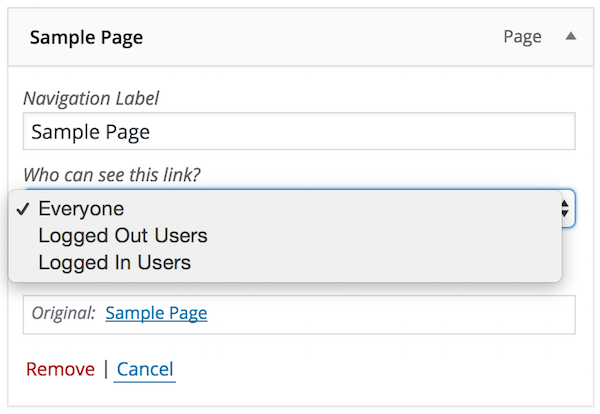
The plugin gives you more control over your nav menu by allowing you to apply visibility controls to menu items e.g., who can see each menu item (everyone, logged out users, logged in users, specific user roles).
It also enables you to display logged in user information in the navigation menu e.g., 'Hello, John Doe'.
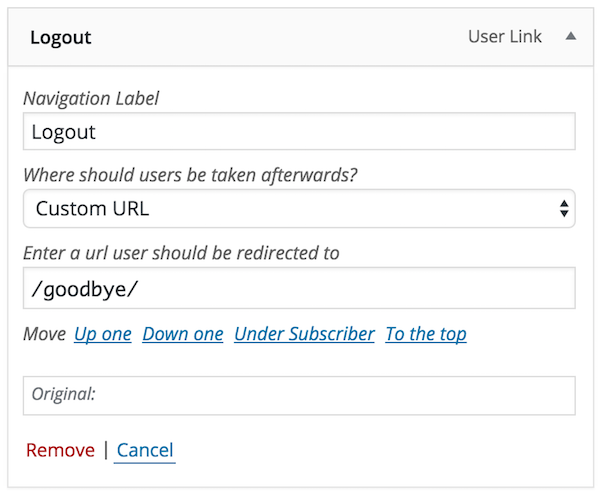
Lastly, the plugin allows you to add login, register, and logout links to your menu.
User Menus allows you to display menu items to everyone or restrict them to specific user roles. You can show a logged in user's avatar, username, first name, last name, display name, nickname, and email in the menu. Additionally, you can add a logout link, register link, and login link with optional redirect settings.
Includes a custom Menu Importer that will allow migrating User Menus data with the normal menu export/import.
User Menus is built by the Code Atlantic team, who create high-quality WordPress plugins that help you grow your WordPress sites.
Other Notable Features
Here are a few other notable features of this free User Menus – Nav Menu Visibility plugin.

Screenshots

FAQ
- To setup the plugin, go to /wp-admin/ > Appearance > Menus.
- Add a menu item or choose an existing one to edit the User Menus settings.
- To see the User Menus settings, expand the menu item that you chose in the Menu structure panel.
- Select Everyone, Logged Out Users, or Logged In Users from the Who can see this link? dropdown.
- Logged In Users: The Choose which roles can see this link radio button is selected by default. If no roles are selected, all roles can see the menu item by default. Once a role is checked, then only checked roles can see the menu item.
- Logged In Users: The Choose which roles won’t see this link radio button is not selected by default. If no roles are selected, all roles still have visibility to the menu item by default. Once a role is checked, then only checked roles won’t see the menu item.
- To show a logged in user’s information in a menu item, make a menu item only visible to logged in users. Click the grey arrow button to add a user tag (username, first_name, last_name, nickname, display_name, email) to the menu item label.
- To add a login or logout link to your menu, expand the User Links under the Add menu items panel, check Login or Logout, then click Add to Menu.
Contributors and developers
“User Menus – Nav Menu Visibility” is open source software. The following people have contributed to this plugin.


 v1.3.2 - 07/19/2023 –

WPS

6.29
Average

Ratings
5 out of 5 | 1267
Version
1.3.2
Last updated
1 year ago
Active installations
90,000+
WordPress version
6.6.4 or higher
PHP version
5.6 or higher
Languages
20Tags
Logout,Menu,Menus,Nav Menu,User-menuOther plugins you might like

Breadcrumb NavXT
By John Havlik
WPS
6.96
Average
132+reviews

active installation
Tested with
6.9
Category Order and Taxonomy Terms Order
By nsp-code
WPS
6.73
Average
161+reviews
active installation
Tested with
6.9
Max Mega Menu
By megamenu
WPS
6.6
Average
853+reviews
active installation
Tested with
6.9
WP Sitemap Page
By Tony Archambeau
WPS
7.25
Very Good
204+reviews
active installation
Tested with
6.8.3
Custom Post Type Permalinks
By Toro_Unit (Hiroshi Urabe)
WPS
6.5
Average
71+reviews
active installation
Tested with
6.6.4
Table of Contents Plus
By Syed Balkhi
WPS
6.48
Average
159+reviews
active installation
Tested with
6.7.4