


Conditional Menus
By themifyme
Description
Conditional Menus is a simple yet useful WordPress plugin that allows you to swap the menus in the theme as per specific conditions. You can have different menus in different posts, pages, categories, archive pages, and more. It works with any WordPress theme that uses the standard WordPress menu function.
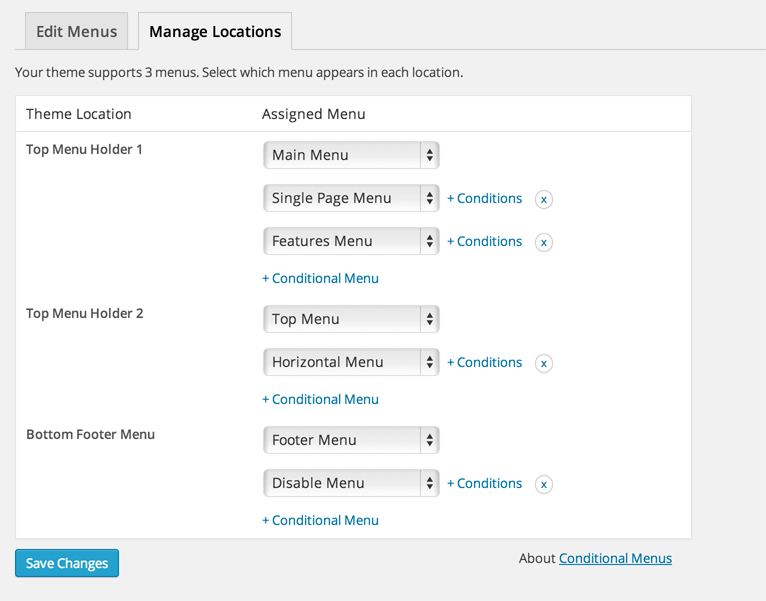
Once you activate the plugin, you will see the conditional menus on the Manage Locations tab located in your WP Admin > Appearance > Menus page. To add a conditional menu, click 'Conditional Menu' and select a menu from the list. You can create these menus in the 'Edit Menus' tab. You can remove the menu by selecting 'Disable Menu' from the list.
Click on '+ Conditions' to add conditions in the modal box, ticking the checkboxes where you want the menu to appear. To remove the conditional menus, click on the 'X' button.
Other Notable Features
Here are a few other notable features of this free Conditional Menus plugin.

Screenshots
Contributors and developers
“Conditional Menus” is open source software. The following people have contributed to this plugin.


WPS

6.69
Average

Ratings
4.4 out of 5 | 72
Version
1.2.7
Last updated
1 month ago
Active installations
60,000+
WordPress version
6.9.4 or higher
PHP version
or higher
Languages
0Tags
Admin,Conditional-tags,Context,Menu,Menu ItemsOther plugins you might like

Breadcrumb NavXT
By John Havlik
WPS
7.68
Very Good
132+reviews

active installation
Tested with
6.9.4
Category Order and Taxonomy Terms Order
By nsp-code
WPS
6.83
Average
162+reviews
active installation
Tested with
6.9.4
WP Sitemap Page
By Tony Archambeau
WPS
7.06
Very Good
205+reviews
active installation
Tested with
6.8.5
Max Mega Menu
By megamenu
WPS
7.53
Very Good
859+reviews
active installation
Tested with
6.9.4
Custom Post Type Permalinks
By Toro_Unit (Hiroshi Urabe)
WPS
6.88
Average
71+reviews
active installation
Tested with
6.6.5
Table of Contents Plus
By Syed Balkhi
WPS
6.71
Average
159+reviews
active installation
Tested with
6.7.5