Excellent
fulfills its purpose completely, very good
SG Optimizer: “Lock Folders” Feature Problematic, Custom Filters Ineffective
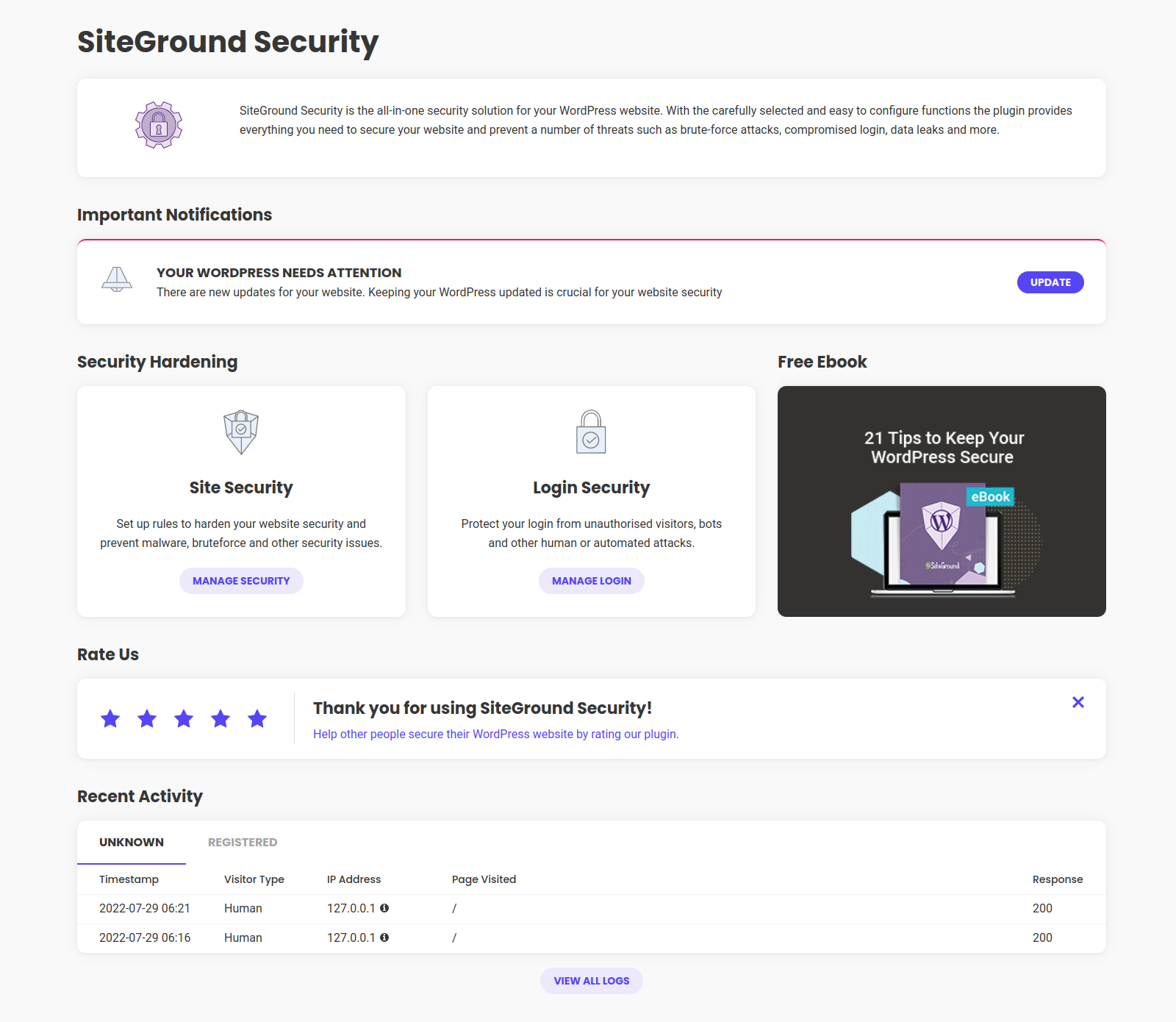
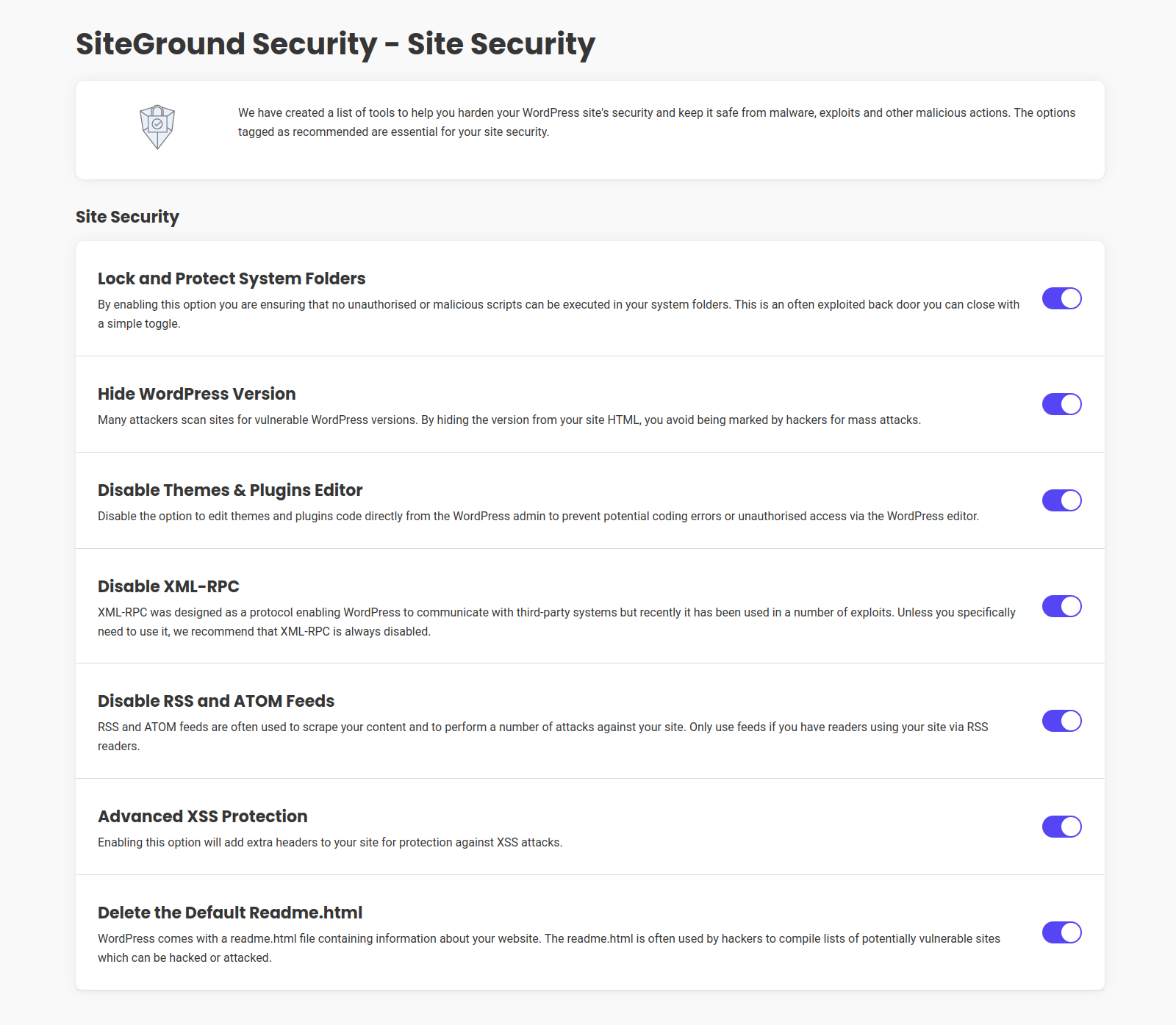
I have been using the SiteGround Security Optimizer plugin to enhance the security of a WordPress site. While the plugin offers a useful suite of tools, I encountered a significant and frustrating obstacle with its “Lock and Protect System Folders” feature and the related PHP custom filter mechanism, which proved ineffective in my specific case. The Specific Problem: Activating the “Lock and Protect System Folders” option correctly identified and blocked direct access to a PHP JavaScript AJAX file (trp-ajax.php) belonging to a well-known and widely used multilingual translation plugin (TranslatePress). This block manifested as Apache AH01630: client denied by server configuration errors in the server logs. Although the basic translation of pages seemed to function initially, the persistence of these errors indicated an underlying malfunction that could compromise secondary but important AJAX functionalities of the translation plugin. Deactivating the “Lock and Protect System Folders” option immediately eliminated the errors, confirming that the block was imposed by this specific SG Optimizer feature. Troubleshooting Attempts Following Official SiteGround Documentation: Wanting to keep the folder protection active, I consulted SiteGround’s official guide “How to Use Security Optimizer’s Custom Filters” to create an exception (whitelist) for the legitimate file. The guide indicates using the sgs_whitelist_wp_content PHP filter. I implemented the necessary PHP snippet via a dedicated code snippet management plugin (Fluent Snippets), ensuring it was active, globally executed, and that all caches (SiteGround server-side, optimization plugins, browser, CDN if present) were meticulously cleared after each modification and before each test. The following path variations for the file to be added to the $whitelist[] array within the function hooked to the sgs_whitelist_wp_content filter were tested: Full relative path from the wp-content folder: Following the most common logic for WordPress filters operating on a base directory, I tried plugins/translation-plugin-name/includes/file-name.php. Base filename only: Literally interpreting the extremely simplified example (‘file_name.php’) provided in the SiteGround guide for the sgs_whitelist_wp_content hook, I tried adding only ‘file-name.php’. Intermediate variations or absolute paths (the latter are generally not used in WordPress filters but were tested for completeness in the initial stages). None of these attempts, despite scrupulously following the instructions and WordPress filter logic, succeeded in creating an effective exception. The trp-ajax.php file continued to be blocked, and the AH01630 errors persisted whenever the “Lock and Protect System Folders” protection was reactivated. Interactions with SiteGround’s AI Assistant: Seeking further assistance, I consulted SiteGround’s AI Assistant. The interactions can be summarized as follows: Initial Report: I described the problem, the error, and the failure of whitelisting attempts using the sgs_whitelist_wp_content filter as per their guide, specifying the path formats already tested. AI’s Responses: The AI Assistant repeatedly suggested the standard solutions already tried and communicated as ineffective: Using the sgs_whitelist_wp_content filter with only the base filename. Using the sgs_whitelist_wp_content filter with the full relative file path. Generic troubleshooting suggestions (clearing cache, testing in incognito, checking file permissions and .htaccess – the latter less relevant given the AH01630 error indicated a server/plugin configuration block, and the PHP filter was intended to manage that configuration). Despite clarifying multiple times that these methods had already been applied unsuccessfully, the AI continued to propose them, entering a loop and eventually suggesting contact with human technical support. Conclusions and Concerns: The experience demonstrates that, at least in my scenario (which I believe to be common: a PHP file from a popular plugin located in a subfolder of wp-content/plugins/), SiteGround Security Optimizer’s custom filter system, particularly sgs_whitelist_wp_content, does not function as documented or as one would expect. This leads to an unpleasant choice for the user: Disable a key security feature (“Lock and Protect System Folders”), potentially reducing the site’s protection level. Accept the malfunctioning of legitimate and necessary plugins, with continuous errors in the logs. The official documentation on custom filters, regarding the sgs_whitelist_wp_content hook, appears to be oversimplified and does not provide clear or effective examples for files nested in subdirectories, which constitute the majority of plugin files. The AI Assistant, relying on such documentation, is unable to offer practical solutions for this problem. A review by SiteGround’s development team would be desirable, both of the sgs_whitelist_wp_content filter’s functionality to ensure it correctly handles full relative paths, and of the documentation to provide more accurate and applicable examples. Furthermore, a clear channel for reporting such product-related issues without the user being immediately directed to potentially paid support channels would be beneficial, especially when the problem seems to lie in a flaw or documentary shortcoming of the tool provided by the hosting itself. As it stands, for anyone using plugins with specific PHP files that are blocked by “Lock and Protect System Folders,” this aspect of the SiteGround Security Optimizer can be more of a hindrance than a help if one is unwilling to forgo that protection.

Horrible. Clashes with everything. Breaches GDPR
This plugin has caused nothing but endless problems. It clashes with Elementor and Papal payment plugins. Of course, all Siteground do is blame the other companies, as if their plugin is perfect. Worst of all it repeatedly asks you to consent to sending data to Siteground. There is no refusal box. So the box pops up every time you choose a different menu selection. It is a cynical attempt to get you tick the box, and allow them to abuse your data, to make it go away. I intend to report Siteground to the ICO for this invasive demand.

dongermibbs
December 25, 2025
|
1 reply
sgs_whitelist_wp_content custom filter doesn’t work
This plugin seems to be designed for SiteGround hosting only. I am using SiteGround, and the plugin works well except for the file whitelisting feature. I applied the sgs_whitelist_wp_content custom filter from the SiteGround documentation; while it resolved the Apache error, the file is still being blocked. This is a known issue for myself and others, specifically regarding the TranslatePress trp-ajax.php file.

Apple.WP-Dev
February 2, 2026
|
1 reply
Horrible. Clashes with everything. Breaches GDPR
This plugin has caused nothing but endless problems. It clashes with Elementor and Papal payment plugins. Of course, all Siteground do is blame the other companies, as if their plugin is perfect. Worst of all it repeatedly asks you to consent to sending data to Siteground. There is no refusal box. So the box pops up every time you choose a different menu selection. It is a cynical attempt to get you tick the box, and allow them to abuse your data, to make it go away. I intend to report Siteground to the ICO for this invasive demand.
dongermibbs
December 25, 2025
|
1 reply
Excellent
Excellent easy to follow info
Excellent
Excellent easy to follow info
Excellent
fulfills its purpose completely, very good
Always my go to
Pretty simple and light weight
Horrible. Clashes with everything. Breaches GDPR
This plugin has caused nothing but endless problems. It clashes with Elementor and Papal payment plugins. Of course, all Siteground do is blame the other companies, as if their plugin is perfect. Worst of all it repeatedly asks you to consent to sending data to Siteground. There is no refusal box. So the box pops up every time you choose a different menu selection. It is a cynical attempt to get you tick the box, and allow them to abuse your data, to make it go away. I intend to report Siteground to the ICO for this invasive demand.
dongermibbs
December 25, 2025
|
1 reply
Annoying
Wouldn’t matter if this was the best plug-in ever created. Having a pop-up ask to share data every time you do something is the most annoying thing in the world.

Kristof
July 15, 2025
|
3 replies
SG Optimizer: “Lock Folders” Feature Problematic, Custom Filters Ineffective
I have been using the SiteGround Security Optimizer plugin to enhance the security of a WordPress site. While the plugin offers a useful suite of tools, I encountered a significant and frustrating obstacle with its “Lock and Protect System Folders” feature and the related PHP custom filter mechanism, which proved ineffective in my specific case. The Specific Problem: Activating the “Lock and Protect System Folders” option correctly identified and blocked direct access to a PHP JavaScript AJAX file (trp-ajax.php) belonging to a well-known and widely used multilingual translation plugin (TranslatePress). This block manifested as Apache AH01630: client denied by server configuration errors in the server logs. Although the basic translation of pages seemed to function initially, the persistence of these errors indicated an underlying malfunction that could compromise secondary but important AJAX functionalities of the translation plugin. Deactivating the “Lock and Protect System Folders” option immediately eliminated the errors, confirming that the block was imposed by this specific SG Optimizer feature. Troubleshooting Attempts Following Official SiteGround Documentation: Wanting to keep the folder protection active, I consulted SiteGround’s official guide “How to Use Security Optimizer’s Custom Filters” to create an exception (whitelist) for the legitimate file. The guide indicates using the sgs_whitelist_wp_content PHP filter. I implemented the necessary PHP snippet via a dedicated code snippet management plugin (Fluent Snippets), ensuring it was active, globally executed, and that all caches (SiteGround server-side, optimization plugins, browser, CDN if present) were meticulously cleared after each modification and before each test. The following path variations for the file to be added to the $whitelist[] array within the function hooked to the sgs_whitelist_wp_content filter were tested: Full relative path from the wp-content folder: Following the most common logic for WordPress filters operating on a base directory, I tried plugins/translation-plugin-name/includes/file-name.php. Base filename only: Literally interpreting the extremely simplified example (‘file_name.php’) provided in the SiteGround guide for the sgs_whitelist_wp_content hook, I tried adding only ‘file-name.php’. Intermediate variations or absolute paths (the latter are generally not used in WordPress filters but were tested for completeness in the initial stages). None of these attempts, despite scrupulously following the instructions and WordPress filter logic, succeeded in creating an effective exception. The trp-ajax.php file continued to be blocked, and the AH01630 errors persisted whenever the “Lock and Protect System Folders” protection was reactivated. Interactions with SiteGround’s AI Assistant: Seeking further assistance, I consulted SiteGround’s AI Assistant. The interactions can be summarized as follows: Initial Report: I described the problem, the error, and the failure of whitelisting attempts using the sgs_whitelist_wp_content filter as per their guide, specifying the path formats already tested. AI’s Responses: The AI Assistant repeatedly suggested the standard solutions already tried and communicated as ineffective: Using the sgs_whitelist_wp_content filter with only the base filename. Using the sgs_whitelist_wp_content filter with the full relative file path. Generic troubleshooting suggestions (clearing cache, testing in incognito, checking file permissions and .htaccess – the latter less relevant given the AH01630 error indicated a server/plugin configuration block, and the PHP filter was intended to manage that configuration). Despite clarifying multiple times that these methods had already been applied unsuccessfully, the AI continued to propose them, entering a loop and eventually suggesting contact with human technical support. Conclusions and Concerns: The experience demonstrates that, at least in my scenario (which I believe to be common: a PHP file from a popular plugin located in a subfolder of wp-content/plugins/), SiteGround Security Optimizer’s custom filter system, particularly sgs_whitelist_wp_content, does not function as documented or as one would expect. This leads to an unpleasant choice for the user: Disable a key security feature (“Lock and Protect System Folders”), potentially reducing the site’s protection level. Accept the malfunctioning of legitimate and necessary plugins, with continuous errors in the logs. The official documentation on custom filters, regarding the sgs_whitelist_wp_content hook, appears to be oversimplified and does not provide clear or effective examples for files nested in subdirectories, which constitute the majority of plugin files. The AI Assistant, relying on such documentation, is unable to offer practical solutions for this problem. A review by SiteGround’s development team would be desirable, both of the sgs_whitelist_wp_content filter’s functionality to ensure it correctly handles full relative paths, and of the documentation to provide more accurate and applicable examples. Furthermore, a clear channel for reporting such product-related issues without the user being immediately directed to potentially paid support channels would be beneficial, especially when the problem seems to lie in a flaw or documentary shortcoming of the tool provided by the hosting itself. As it stands, for anyone using plugins with specific PHP files that are blocked by “Lock and Protect System Folders,” this aspect of the SiteGround Security Optimizer can be more of a hindrance than a help if one is unwilling to forgo that protection.








 Version 1.5.9 –