ImageLinks – Interactive Image Builder with Hotspots Review - In-Depth Analysis
Create interactive images that empower publishers and bloggers. Tag images with web content for enhanced engagement.
Performance Overview
User Rating
3.9/5 (based on 9+
reviews)
Active Installations
1,000+
Update Frequency
Below Average
It is calculated using the weighted average of same category
plugins.
Security Score
5.77 / 10
(Medium Risk)
It is calculated using the weighted average of all versions.
What It Does
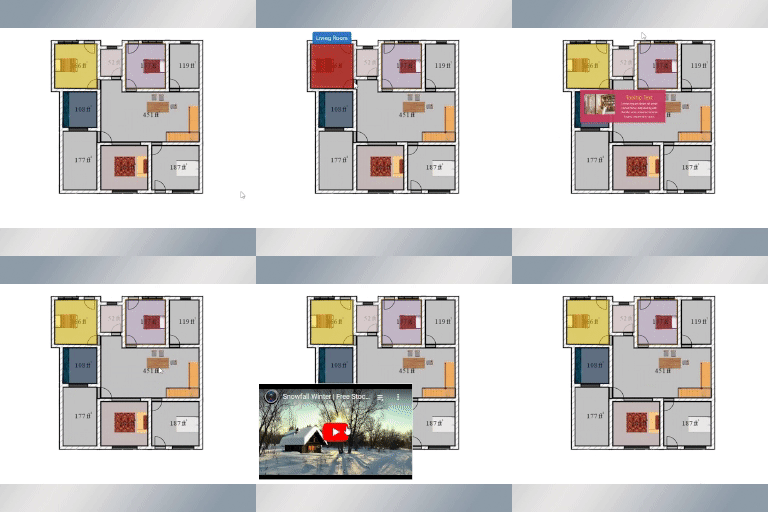
ImageLinks is a WordPress plugin that allows you to tag images with any web content, making them more interactive. You can take any image and tag it with hyperlinks to webpages, videos, and other online content. This plugin provides rich previews of tagged media, allowing users to interact with content directly on the image.
Using the shortcode [imagelinks id="123"] you can publish an interactive image on any page or post in your WordPress site. The plugin features an advanced builder with drag and drop capabilities, multiple instances, customizable markers, and tooltips for additional information.
This is the LITE version of the ImageLinks plugin, which comes with some limitations compared to the pro version. Ideal for creating interactive infographics, product maps, and shoppable catalogs.
Comparing to Alternatives
ImageLinks offers interactive image building with hotspots, but several other plugins provide similar features with different strengths and limitations.
Strengths
- User-friendly interface with high functionality
- Responsive and helpful customer support
- Includes a pro version with additional features
- Allows creation of interactive image hotspots
Weaknesses
- Free version restricts users to only one map
- Free version displays an unwanted icon on images
- Mobile responsiveness issues with popovers
- Past security vulnerabilities requiring updates
User Sentiment Analysis
With a 3.9 average rating from 9 reviews, most users appreciate the plugin's functionality and support, though some express frustration over limitations in the free version.
Positive highlights
- 'High functionality and fantastic support. A must-have for any WordPress Site' – stenver
- 'Great plugin. Plus the author sent me JS code to fix a scrolling issue – and – CSS code to improve user experience' – nicholas012
- 'This useful plugin is working very well and does exactly what we needed. The author was very helpful' – holyhat
- 'Nice plugin overall but has bug on mobile, popover is not responsive' – ismailfarooq
Common complaints
- Free version only allows one map, which is not clearly stated
- Free version adds an unwanted icon on images, leading to removal
Weaknesses
- Limited free version functionality frustrates users
- Mobile popover responsiveness issues
- Past security vulnerabilities with SQLi and XSS attacks
Who Should Use This?
Best for
Users who need an easy-to-use interactive image builder with good support and are willing to upgrade for multiple maps and advanced features.
Not ideal for
Those who require multiple maps in the free version or dislike visual branding on free plugins; also users concerned about past security issues should ensure they use the latest version.
Pricing & Value
Free version includes
Allows creation of one interactive image map with basic hotspot features but includes a branding icon and limits to a single map.
Pro version
Unlocks multiple maps, removes branding icons, adds advanced hotspot options, and improves mobile responsiveness.
Final Verdict
ImageLinks is a solid interactive image builder with strong support and useful features, especially for users who upgrade to the pro version. However, the free version's limitations on map quantity and branding icon may frustrate some users.
While past security vulnerabilities have been addressed in updates, users should ensure they run the latest version. Alternatives exist with different feature sets, so consider your specific needs before choosing.
Other Notable Features
Here are a few other notable features of this free
ImageLinks – Interactive Image Builder with Hotspots plugin.
FAQ
You can get access to more features and support by visiting the CodeCanyon website and
purchasing the plugin.
Purchasing the plugin gets you access to the full version of the ImageLinks plugin, automatic updates and support.
The lite version has only two limits:
1) You can create and use only one item
2) Your published item will have a little icon
All other features are the same as PRO has.
Contributors and developers
“ImageLinks – Interactive Image Builder with Hotspots”
is open source software. The following people have
contributed to this plugin.